
Updated with Gmail, Hotmail and Yahoo Maill Server Settings: IMAP, POP3 and SMTP Settings.
The Email Server Settings Database – Free Lookup.
Lookup the email server settings for your email provider, in seconds. SMTP, IMAP and POP3 settings.
Scroll down this page to find the SMTP, IMAP and POP3 server, SSL and port settings for the TOP 30 email providers.
Do you need the email settings for an email program, or for a phone app?
Then you have come to the right pleace. Here, you can look up the SMTP, IMAP and POP3 email server settings for your email provider, and learn more about email settings in general.
What is SMTP?
What does the abbreviation SMTP stand for? It stands for Simple Mail Transfer Protocol, and it is the standard method that handles email exchange and delivery, across Internet Protocol addresses, or IPs.
When someone sends an email message to a friend via a mail client (email program), it will go to an Outgoing Server (or SMTP server), which is the server that starts a conversation with the friend’s Incoming Server via the internet.
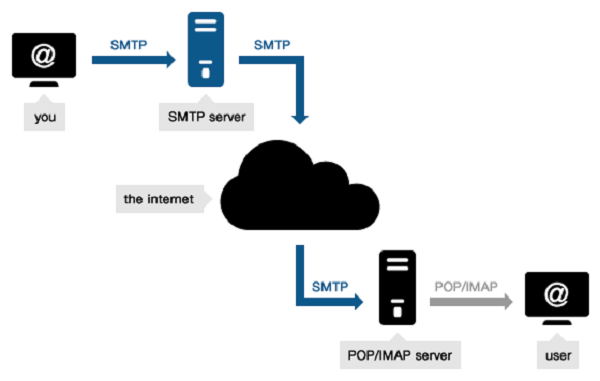
The two servers “talk” SMTP, so to speak. The SMTP protocol provides the guidelines to making incoming and outgoing servers identify themselves and to communicate, who is the recipient, and who is the sender, and so, how to deliver the email.
Any large email provider has an associated SMTP server that takes care of the email delivery process.
Emailsetting.org does not store or share your email details. Your email address is used to search for email settings only. You can make up an email address, with the same domain postfix, if you do not want to share your email address.
Email Server Settings.
These are the server settings for the top 20 most popular email providers.
|
EMAIL PROVIDER |
URL |
SMTP SERVER |
POP / POP3 SERVER |
IMAP SERVER |
|
1&1 |
1and1.com |
Smtp.1and1.com |
Pop.1and1.com |
imap.1and1.com |
|
Airmail |
Airmail.net |
Mail.airmail.net |
Pop3.airmail.net |
imap.airmail.net |
|
AOL |
Aol.com |
Smtp.aol.com |
Pop.aol.com |
imap.aol.com |
|
AT&T |
Att.net |
Outbound.att.net |
Inbound.att.net |
imap.mail.att.net |
|
Bluewin |
Bluewin.ch |
Smtpauths.bluewin.ch |
Pop3s.bluewin.ch |
imaps.bluewin.ch |
|
BT Connect |
Btconnect.com |
Mail.btconnect.tom |
Pop3.btconnect.com |
Imap disabled |
|
Comcast |
Comcast.net |
Smtp.comcast.net |
Mail.comcast.net |
imap.comcast.net |
|
Earthlink |
Earthlink.net |
Smtpauth.earthlink.net |
Pop.earthlink.net |
imap.earthlink.net. |
|
Gmail |
Gmail.com |
Smtp.gmail.com |
Pop.gmail.com |
imap.gmail.com |
|
Gmx |
Gmx.net |
Mail.gmx.net |
Pop.gmx.net |
imap.gmx.com |
|
HotPop |
Hotpop.com |
Mail.hotpop.com |
Pop.hotpop.com |
imap disabled |
|
Libero |
Libero.it |
Mail.libero.it |
Popmail.libero.it |
imapmail.libero.it |
|
Lycos |
Lycos.com |
Smtp.mail.lycos.com |
Pop.mail.lycos.com |
imap.mail.lycos.com |
|
O2 |
o2.com |
Smtp.o2.com |
Mail.o2.com |
imap.o2.com |
|
Orange |
Orange.net |
Smtp.orange.net |
Pop.orange.net |
imap.orange.net |
|
Outlook.com (was Hotmail) |
Outlook.com |
Smtp.live.com |
Pop3.live.com |
imap-mail.outlook.com |
|
Tin |
Tin.it |
Mail.tin.it |
Pop.tin.it / Box.tin.it |
Box.tin.it |
|
Tiscali |
Tiscali.co.uk |
Smtp.tiscali.co.uk |
Pop.tiscali.co.uk |
imap.tiscali.co.uk |
|
Verizon |
Verizon.net |
Outgoing.verizon.net |
Incoming.verizon.net |
Incoming.verizon.net |
|
Virgin |
Virgin.net |
Smtp.virgin.net |
Pop.virgin.net |
imap4.virgin.net |
|
Wanadoo |
Wanadoo.fr |
Smtp.wanadoo.fr |
Pop.wanadoo.fr |
imap.orange.fr |
|
Yahoo |
Yahoo.com |
Smtp.mail.yahoo.com |
Pop.mail.yahoo.com |
imap.mail.yahoo.com |
PORT, SSL and Password Server Settings.
| EMAIL PROVIDERS – TOP 35 EMAIL PROVIDERS |
||||||||
| INCOMING MAIL SERVER |
OUTGOING MAIL SERVER | |||||||
| Server name | Port | Type | Security | Server name | Port | Security | Requires Password |
|
| aim.com | imap.aim.com | 143 | IMAP4 | none | smtp.aim.com | 587 | none | Yes |
| aol.com | imap.aol.com | 143 | IMAP4 | none | smtp.aol.com | 587 | none | Yes |
| att.net | pop.att.yahoo.com | 995 | POP3 | SSL (always) | smtp.att.yahoo.com | 465 | SSL (always) | Yes |
| bellsouth.net | pop.att.yahoo.com | 995 or 110 | POP3 | SSL (always) | smtp.att.yahoo.com | 465 or 25 | SMTP | Yes |
| charter.net | mobile.charter.net | 993 | IMAP4 | SSL (always) | mobile.charter.net | 587 | SSL (always) | Yes |
| charter.net | mail.charterinternet.com | 110 | POP3 | none | smtp.charterinternet.com | 25 | none | Yes |
| comcast.net | mail.comcast.net | 110 | POP3 | none | smtp.comcast.net | 587 | none | No |
| cs.com | imap.imap-r.rotors.cs.com | 143 | IMAP4 | none | smtp.cs.com | 25 | none | No |
| earthlink.net | pop.earthlink.net | 110 | POP3 | none | smtpauth.earthlink.net | 587 or 25 | none | Yes |
| excite.com | pop3.excite.com | 110 | POP3 | none | smtp.excite.com | 25 | none | Yes |
| flash.net | pop.att.yahoo.com | 995 or 110 | POP3 | SSL (always) | smtp.att.yahoo.com | 465 or 25 | SSL (always) | Yes |
| Gmail.com | imap.gmail.com | 993 | IMAP4 | SSL (always) | smtp.gmail.com | 465 | SSL (always) | Yes |
| Gmail.com | pop.gmail.com | 995 | POP3 | SSL (always) | smtp.gmail.com | 465 (SSL) or 587 (TLS) | SSL or TLS | Yes |
| googlemail.com | imap.googlemail.com | 993 | IMAP4 | SSL (always) | smtp.gmail.com | 465 | SSL (always) | Yes |
| hotmail.com | pop3.live.com | 995 | POP3 | SSL (always) | smtp.live.com | 587 or 25 | TLS (always) | Yes |
| hotpop.com | pop.hotpop.com | 110 | POP3 | smtp-1.hotpop.com | 25 | Yes | ||
| juno.com | pop.juno.com | 110 | POP3 | authsmtp.juno.com | 25 | Yes | ||
| live.com | pop3.live.com | 995 | POP3 | smtp.live.com | 25 | Yes | ||
| lycos.com | pop.mail.lycos.com | 110 | POP3 | none | smtp.mail.lycos.com | 25 | Yes | |
| mac.com | mail.mac.com | 993 | IMAP4 | smtp.mac.com | 25 | Yes | ||
| me.com | mail.me.com | 993 | IMAP4 | smtp.me.com | 25 | Yes | ||
| mindspring.com | pop.mindspring.com | 110 | POP3 | smtp.mindspring.com | 25 | Yes | ||
| msn.com | pop3.live.com (or pop3.email.msn.com) | 995 or 110 | POP3 | SSL (always) | smtp.live.com (or smtp.email.msn.com) | 587 or 25 | TLS (always) | Yes |
| netzero.net | pop.netzero.net | 110 | POP3 | none | smtp.netzero.net (or authsmtp.netzero.com) | 587 or 25 | No | |
| nvbell.net | pop.att.yahoo.com | 995 or 110 | POP3 | SSL (always) | smtp.att.yahoo.com | 465 or 25 | SSL (always) | Yes |
| pacbell.net | pop.att.yahoo.com | 995 or 110 | POP3 | SSL (always) | smtp.att.yahoo.com | 465 or 25 | SSL (always) | Yes |
| prodigy.net | pop.prodigy.yahoo.com | 110 | POP3 | smtp.prodigy.yahoo.com | 25 | Yes | ||
| rocketmail.com | imap.mail.yahoo.com | 143 | IMAP4 | smtp.mobile.mail.yahoo.com | 25 | |||
| sbcglobal.net | pop.att.yahoo.com | 995 or 110 | POP3 | SSL (always) | smtp.att.yahoo.com | 465 or 25 | SSL (always) | Yes |
| snet.net | pop.att.yahoo.com | 995 or 110 | POP3 | SSL (always) | smtp.att.yahoo.com | 465 or 25 | SSL (always) | Yes |
| swbell.net | pop.att.yahoo.com | 995 or 110 | POP3 | SSL (always) | smtp.att.yahoo.com | 465 or 25 | SSL (always) | Yes |
| verizon.net | incoming.verizon.net | 110 | POP3 | none | outgoing.verizon.net | 25 | Yes | |
| wans.net | pop.wans.yahoo.com | 110 | POP3 | smtp.wans.yahoo.com | 25 | Yes | ||
| yahoo.com | imap.mail.yahoo.com | 995 or 143 | IMAP4 | smtp.mobile.mail.yahoo.com | 587 or 25 | SSL (always) | Yes | |
| ymail.com | imap.mail.yahoo.com | 143 | IMAP4 | smtp.mobile.mail.yahoo.com | 25 | Yes | ||
Other Helpful Resources:
- SMTP Server
- Roadrunner email login Roadrunner Webmail Login
- TWC Mail Time Warner Cable Email Login
- Mcdvoice Mcdonalds Survey Portal.
- Walmartone New Walmartone Portal
- Onewalmart New Walmartone Website – Help and FAQ
- Walmartone Old Walmartone Portal – Help and FAQ
- Asda Walmartone – Asda Total Package.
- Myloweslife Corporate Contacts
- Walmart Wire Login Walmart Associate Login
- Flying Together United Airlines Intranet
- TM Menards Login Employee Portal
- Libgen – Libgen Guide
- Restroom near me Restrooms Near me
- Prepaidgiftbalance – Prepaidgiftbalance Balance Check.
- Soap2day
- Fmovies
- Flixhq
- i Ready
- Homeworkify: Homeworkify chegg.
-
Other Resources.
- Liteblue Usps Login
- AOL Mail Login
- Walmart Onewire
- Onewalmart
- Walmartone
- MythDHR Login
- MythDHR
- Myprepaidcenter.com
- Macys Insite
- Myaccountaccess
- TM Menards
- Walmart Call In Number
- Worksmart Michaels ETM
- Liteblue USPS Gov New USPS Home Login.
- Onewalmart New Walmartone Portal
- Walmartone Login Old Walmartone Portal
- Mcdvoice.com Mcdonalds Survey Portal
- Roadrunner Login Roadrunner Webmail Login
- TWC Login Time Warner Cable Email Login
- TM Menards Employee Portal
- One.Walmart.com
- Aka Ms Remoteconnect PS4
UK Login:
- Other Helpful Resources.
- Funny Dad Jokes Dad Jokes Library, Goofy Ahh, and funny, but bad dad jokes.
- i-Ready Diagnostic Scores by Grade Math 2025 and iReady Dignostic Scores by Grade Reading 2025
- Map scores by grade level 2026 and Map scores by grade level 2026 Chart.
- Mcgift.giftcardmall Balance.
- Giftcardmall.com/mygift and www.giftcardmall.com/mygift Balance.
- Giftcardmall.com/mygift and Giftcardmall.com/mygift Card Activation.
- Target Gift Card Balance Check and Vanillagift.com Check
- Prepaidgiftbalance, Mybalancenow balance and Myprepaidcenter Balance Check
- Mcdvoice.com Survey with receipt, mcdvoice com survey with receipt, www.mcdvoice.com and mcdonald’s breakfast hours
- Mcdvoice survey and Mcdvoice.com. Mcdfoodforthoughts and www.mcdonalds/deinfeedback.
- EZ Grader Calculator and College GPA Calculator.
- Blooket Login Joinpdcom and Blooket Join.
- What is the average IQ of a 12-year old
- Map Scores by Grade Level 2025
- Map Scores by Grade Level 2025
- Mcgift.giftcardmall
- giftcardmall.com/mygift activate
- Mcgift.giftcardmall
- www.giftcardmall.com/mygift
- giftcardmall.com/mygift
- Map Test Scores by Grade Level
- Easy Riddles for Kids
- Hard Riddles for Adults
- High School Levels
- Blooket Login
- Flipgrid Login
- I-Ready login
- What is a Good I-Ready Diagnostic Score
- Oops Where is My Test Window
- What Should I Draw today ideas
- Drawing Ideas for Beginners
- Easy How to Draw a Rose
- What is Level E in i Ready
- What is a Good iReady Diagnostic Score for 8th Grade
- Cute Easy Things to Draw
- What is an average SAT Score
- BMI Chart for Kids by Age
- Average Height Chart Kids
- What is the Average Height for a 13 Year Old
- Cool Easy Things to Draw
- Cute Easy Things to Draw
- AP Scores Distribution Lit
- When Do AP Scores Come Out in 2025
- What is a good GPA in College
- What is an Average GPA in College
- Convert to GPA 4.0 Scale
- CogAT Test Scores
- Woodcock Johnson Test
- Woodcock Johnson Test Scoring
- i-Ready Diagnostic Scores 2024
- i-Ready Diagnostic Scores 2024 Math
- MAP Scores by Grade Level 2024
- MAP Scores by Grade Level Chart
- NWEA Teacher Login
- NWEA Student Login
- JoinPDCom
- i-Ready Diagnostic Scores by grade 2024 Math
- i-Ready Diagnostic Grades by grade 2024 Reading
- How to Cancel Chegg Subscription
- How to See Chegg Answers for Free
- Homeworkify
- SchoolMax Portal
- Nitro Type Math Login
- Clever.com Portal Login
- i-Ready Diagnostic Scores Math
- i-Ready Diagnostic Scores Chart
- i-Ready Diagnostic Scores Login
- Connections Hint Today
- JoinPD.com
- i-Ready FAQ
- i-Ready Math
- Reading Levels by Grade Level
- What is Level Z in i-Ready
- www.Kroger.com Feedback
- Keto gummies
- Myprepaidcenter.com.Activation Required
- gummies for mood
- Prepaidgiftbalance.com
- EZ Grader Calculator and GPA Grade Calculator
- Funny dad jokes and Yo Mama jokes and stupid dad jokes and Top 5 Best Jokes ever. Would you rather questions, Jokes for 5 year olds, Jokes for 7 year olds, Knock Knock jokes for kids,
- www.giftcardmall.com/mygift balance Giftcardmall.com/mygift activate and check balance.
Mcgift.giftcardmall.com Mcgift.giftcardmall.com activate Mastercard and check balance
Blooket Play Blooket and see Blooket codes.
my sainsburys – Mysainsburys Uk Login
my sainsburys Mysainsburys Colleague Login
my sainsburys – Oursainsburys Login
oursainsburys login – Oursainsburys New Login
roadrunner login Roadrunner Email login Official and Roadrunner Login
wmlink 2step login – Walmart Wmlink 2step Login, Wmlink 2sv and Wmlink/2step 2FA Verification
How to use Google Authenticator
Ao3 – Archive of Our Own, Ao3 help, Ao3 Online
flyingtogether – Flying Together UAL Employee Portal
Uge Schedule Source net – The Uge Schedule Source Login Page
Spark Driver Customer Server – This is the Spark Customer Service Phone Number page.
Tumblr官网 Cn – Tumbler China
iReady Score Charts and NWEA Map Score Charts:
i-Ready Diagnostic Scores 2026 – i-Ready Diagnostic Scores by Grade Math – i-Ready Diagnostic Scores by grade reading
iready Diangostic Scores – What is iReady Diagnostic
What is Level D in iready Math – Explains all the different iReady Level
NWEA Map Scores by Grade Level – NWEA Map Scores 2026-2027
What is a good NWEA Map Score – NWEA Map Score FAQ and What is a Good Map Score for each grade level.
Map scores by Grade Level – See the NWEA Test Map Scores by Grade Level Charts for 2026-2027.
Twitch直播 – Twitch China
Deviantart官网 -DeviantArt China
Server Settings FAQ – IMAP, POP3 and SMTP Settings for Gmail, Hotmail and Yahoo Mail
Email server settings allow applications such as Outlook, Apple Mail, Thunderbird, Android Mail, and iPhone Mail to connect to your email account correctly. Most email providers use three core technologies: IMAP, POP3, and SMTP. Correct incoming and outgoing server settings are important because even one incorrect port number, security option, or username setting can prevent email from sending or receiving properly.
What are IMAP, POP3 and SMTP server settings?
IMAP, POP3 and SMTP are the three main technologies used to receive and send email messages through mail applications and devices. IMAP synchronizes mail across devices, POP3 usually downloads messages locally, and SMTP handles outgoing email delivery, so understanding all three is important when setting up Gmail, Yahoo Mail, Outlook, Hotmail, and other providers.
What are Gmail IMAP server settings?
Gmail IMAP settings are: incoming server imap.gmail.com, port 993, and SSL/TLS enabled. Use your full Gmail address as the username and remember that many email apps require either an app password or modern authentication methods when additional account security settings are enabled.
What are Gmail SMTP settings?
Gmail SMTP settings are: outgoing server smtp.gmail.com, port 465 for SSL or 587 for TLS. Always enable authentication and use your complete Gmail address as the username because Gmail blocks many outgoing messages if authentication or security settings are incorrect.
What are Gmail POP3 settings?
Gmail POP3 settings are: incoming server pop.gmail.com, port 995, with SSL enabled. POP3 downloads mail differently than IMAP and may remove messages from the server depending on account preferences, so many users prefer IMAP for synchronization across phones and computers.
What are Yahoo Mail IMAP settings?
Yahoo Mail IMAP settings are: server imap.mail.yahoo.com, port 993, and SSL/TLS enabled. Use your complete Yahoo Mail address and remember that Yahoo sometimes requires app-specific passwords when using Outlook, Apple Mail, Thunderbird, or other third-party email programs.
What are Yahoo Mail SMTP settings?
Yahoo Mail SMTP settings are: outgoing server smtp.mail.yahoo.com, port 465 or 587. Outgoing authentication should remain enabled because Yahoo blocks many unauthenticated outgoing connections for account security and spam prevention purposes.
What are Yahoo Mail POP3 settings?
Yahoo POP3 settings are: server pop.mail.yahoo.com, port 995, with SSL enabled. POP3 may be useful if you want email downloaded primarily to a single device, but users with multiple phones or computers often experience fewer synchronization problems with IMAP.
What are Hotmail or Outlook IMAP settings?
Hotmail and Outlook IMAP settings are: incoming server outlook.office365.com, port 993, with SSL enabled. Microsoft moved many legacy Hotmail systems into the Outlook infrastructure, so older Hotmail addresses generally use Outlook server settings today.
What are Hotmail SMTP settings?
Hotmail SMTP settings are: outgoing server smtp.office365.com, port 587, with STARTTLS enabled. Microsoft accounts often use modern authentication and security verification systems, so incorrect passwords or missing authentication settings frequently cause setup problems.
What are Hotmail POP3 settings?
Hotmail POP3 settings are: incoming server outlook.office365.com, port 995, with SSL enabled. POP3 remains available, although IMAP is often recommended because it keeps email synchronized across desktop applications, tablets, and smartphones.
What is the difference between IMAP and POP3?
IMAP keeps messages synchronized across devices while POP3 primarily downloads messages onto one device. Users with laptops, phones, and tablets usually prefer IMAP because actions such as deleting, reading, and organizing messages remain consistent across all connected devices.
Which is better: IMAP or POP3?
IMAP is generally better for most users because it synchronizes email across multiple devices and keeps messages stored on the server. POP3 may still be useful if storage space is limited or if users want mail stored primarily on a single computer.
What does SMTP do?
SMTP handles outgoing email delivery and is responsible for sending messages from your email application to the recipient’s server. If SMTP settings are incorrect, users can often receive messages normally but cannot send emails successfully.
Why does my email say authentication failed?
Authentication failures usually happen because of incorrect passwords, outdated settings, app-password requirements, or security verification issues. Check for extra spaces after copied passwords and verify that usernames use the complete email address format.
Why does SMTP error 535 appear?
SMTP 535 errors usually indicate incorrect credentials or blocked authentication attempts. The problem often occurs after password changes, account security updates, or when two-factor authentication requires creation of a dedicated app password.
Why are emails receiving but not sending?
This usually indicates SMTP settings are incorrect while incoming settings remain correct. Check the outgoing server address, port number, authentication settings, and encryption type because even one mismatch can block outgoing messages.
Why does my email app say server not responding?
A server not responding error usually means the incoming or outgoing server address, port, encryption setting, or internet connection is incorrect. Check for typing mistakes in the server name and verify that VPN services, antivirus tools, firewalls, or restrictive Wi-Fi networks are not blocking secure email connections.
What port does IMAP use?
IMAP usually uses port 993 with SSL/TLS encryption enabled for secure communication. Older non-encrypted IMAP connections sometimes used port 143, but most providers now recommend encrypted connections because they better protect passwords and email data.
What port does POP3 use?
POP3 usually uses port 995 when SSL encryption is enabled. Older non-secure configurations sometimes used port 110, but most modern providers prefer encrypted connections because they reduce security risks and protect account information.
What port does SMTP use?
SMTP commonly uses port 465 for SSL connections or port 587 for TLS/STARTTLS connections. If one port fails, some email applications allow trying the alternative because different networks and providers may prefer different configurations.
What does SSL mean in email settings?
SSL means Secure Sockets Layer and encrypts communication between your device and the email server. Most modern providers use SSL or TLS to protect usernames, passwords, and message content from being intercepted over public or unsecured networks.
What does TLS mean in email settings?
TLS stands for Transport Layer Security and is the modern replacement for older SSL methods. Many email applications automatically select TLS when available because it provides improved security and compatibility with modern email servers.
Should outgoing server authentication be enabled?
Yes, outgoing server authentication should usually be enabled because Gmail, Yahoo Mail, Outlook, and many providers require it. Without SMTP authentication enabled, messages often fail to send even though incoming mail works correctly.
What username should I use in email settings?
You should usually use your full email address as the username unless your provider specifically says otherwise. Entering only the name before the @ symbol often causes connection and authentication failures.
Why does my password work on the website but not in Outlook?
This often happens because the email app requires an app password or newer authentication methods. Providers such as Gmail and Yahoo may reject standard passwords in third-party apps when additional account security is enabled.
What is an app password?
An app password is a special password generated for email programs and older applications. It is commonly required when two-factor authentication is enabled because many email clients cannot directly complete advanced security verification steps.
How do I create a Gmail app password?
Gmail app passwords are created through your Google account security settings after enabling two-step verification. Once generated, the app password replaces your normal password inside Outlook, Apple Mail, Thunderbird, and other email applications.
How do I create a Yahoo Mail app password?
Yahoo Mail app passwords are generated inside account security settings and used in place of your regular password. This often solves authentication errors when connecting Yahoo accounts to desktop or mobile mail applications.
Why does Outlook repeatedly ask for my password?
Repeated password prompts usually indicate incorrect credentials, damaged profiles, or authentication failures. Updating stored passwords, removing and re-adding the account, or recreating the Outlook profile often fixes the issue.
Why are my folders not syncing?
Folder synchronization issues usually happen because IMAP settings are disabled or folder subscriptions are incomplete. Check whether the email client supports full IMAP synchronization and confirm that required folders are selected for syncing.
Why are deleted emails reappearing?
Deleted emails often reappear because multiple devices are syncing incorrectly or because POP3 settings conflict with server behavior. IMAP generally handles deletion more consistently because all devices synchronize against the same server copy.
What is the difference between Gmail and Google Workspace server settings?
Gmail and Google Workspace often use similar servers, including smtp.gmail.com and imap.gmail.com. Business accounts may have additional security rules, administrator controls, or domain-specific settings that affect email configuration.
Can I use Gmail in Microsoft Outlook?
Yes, Gmail works with Microsoft Outlook using IMAP, POP3, and SMTP settings. Users frequently need app passwords or modern authentication approval when connecting Gmail accounts to Outlook.
Can I use Yahoo Mail in Apple Mail?
Yes, Yahoo Mail works with Apple Mail using Yahoo’s IMAP and SMTP settings. Apple devices often auto-detect settings, although app passwords may still be required for successful setup.
Can I use Hotmail with Thunderbird?
Yes, Hotmail and Outlook accounts can be configured in Thunderbird using Outlook IMAP and SMTP settings. Thunderbird frequently detects settings automatically, but manual configuration remains available if needed.
Why are old emails missing?
Missing old emails often happen because synchronization limits or POP3 settings prevent full downloads. Some apps only sync recent messages unless settings are changed to download complete mailbox history.
What does connection timed out mean?
Connection timeout errors usually indicate slow internet, firewall restrictions, incorrect ports, or unreachable servers. Testing another network or temporarily disabling security software can help isolate the cause.
Can antivirus software block email settings?
Yes, antivirus software can interfere with SMTP, POP3, and IMAP connections. Some security programs inspect encrypted traffic and may accidentally interrupt secure email communication.
Can a VPN break email connections?
Yes, VPN services sometimes interfere with secure email server communication. Switching VPN locations or temporarily disabling the VPN may resolve server connection failures.
Why do I see certificate warnings?
Certificate warnings usually indicate outdated security certificates or incorrect server settings. Verify that server addresses exactly match official provider settings before accepting security exceptions.
Why does Outlook say cannot connect securely?
This usually indicates mismatched ports or encryption settings between Outlook and the mail server. Double-check whether SSL or TLS is required and verify the correct server addresses.
How often does IMAP sync?
IMAP synchronization frequency depends on the application and device settings being used. Some applications sync continuously while others refresh every few minutes or on manual request.
Does POP3 remove mail from the server?
POP3 can remove messages from the server depending on account settings. Many email clients include options to leave a copy on the server for a specific number of days.
Why do sent emails disappear?
Sent email problems often occur because the sent folder mapping is incorrect. Many applications allow manual selection of which folder should store outgoing messages.
What are Gmail incoming server settings?
Gmail incoming settings are IMAP: imap.gmail.com, port 993, SSL enabled; POP3: pop.gmail.com, port 995. Always use your full Gmail address as the username.
What are Gmail outgoing server settings?
Gmail outgoing settings use smtp.gmail.com with port 465 or 587. Authentication should remain enabled and secure connections should use SSL or TLS.
What are Yahoo incoming settings?
Yahoo incoming settings use imap.mail.yahoo.com for IMAP or pop.mail.yahoo.com for POP3. SSL encryption should remain enabled for secure communication.
What are Yahoo outgoing settings?
Yahoo SMTP settings use smtp.mail.yahoo.com on port 465 or 587. Full email addresses and authentication are generally required.
What are Hotmail incoming settings?
Hotmail incoming settings generally use outlook.office365.com with IMAP port 993. Microsoft migrated most Hotmail accounts to Outlook infrastructure.
What are Hotmail outgoing settings?
Hotmail outgoing settings use smtp.office365.com on port 587. STARTTLS should normally remain enabled for proper security.
Can I use one email account on multiple devices?
Yes, IMAP allows one email account to synchronize across phones, tablets, and computers. Actions like reading or deleting messages remain synchronized across devices.
What should I do before changing server settings?
Before changing server settings, write down your existing configuration and verify your password. Screenshots or notes make it easier to restore settings if something goes wrong.
Why does email setup suddenly stop working?
Sudden failures often happen after password changes, account security updates, or provider policy changes. Re-entering credentials and checking for provider announcements may resolve the issue.
Can providers change email server settings?
Yes, providers occasionally update servers, security standards, and authentication methods. Keeping email applications updated reduces compatibility problems.
What is the safest email protocol?
IMAP with SSL/TLS encryption is generally considered the safest and most practical choice for most users. It provides synchronization while maintaining encrypted communication.
Should I choose IMAP during setup?
Yes, IMAP is usually recommended for most users with multiple devices. It keeps messages synchronized and reduces confusion caused by local-only storage.
Can email server settings differ by country?
Usually server settings remain globally consistent, but some enterprise or regional services may vary. Business and ISP-hosted email systems sometimes use unique server names.
Why does email work on my phone but not computer?
This often happens because phones use automatic setup while desktop applications rely on manual configuration. Comparing settings between devices often reveals the mismatch.
How can I quickly test if server settings are correct?
You can test settings by sending a message to yourself and verifying delivery in both directions. Successful sending and receiving usually confirm that incoming and outgoing settings are working properly.
What should I check first if email setup fails?
First verify the server name, port number, password, and encryption type. Small mistakes such as an extra space after a copied password frequently cause setup failures.
Use the search function on this page to find the email service settings, that you are looking for.